Form For Later

Never lose your progress again! Pick up exactly where you left off with FormForLater.

It saves what you type into long forms, right on your device. Come back whenever, and put it all back in one click.

FREE · NO ACCOUNT · YOUR DATA STAYS ON YOUR DEVICE

Coming soon

FormForLater is coming to iPhone.

We're launching on the App Store on September 27, 2026. It does the same thing as the extension: saves what you type, so a bad connection or a locked screen never costs you the form again. Leave your email and we'll tell you the day it's live — nothing else.

App Store launchSept 27, 2026
Join the waitlist
How it works 01 / 06

Save it. Walk away. Come back.

01

Save what's on screen

One click. FormForLater reads the label you can see, not just the code behind the field.

02

Close the tab, come back whenever

Nothing leaves your device while you're away. No timer, no pressure.

03

Restore in one click

Every saved answer goes back where it was, and it tells you if it had to guess.

Works across pages, too.

A lot of long forms aren't one page — they're five or six, filled in over several days. FormForLater keeps each page as its own step in the same record. Fill in a five-page application over three days. Get all five pages back, each one restored on the page it belongs to. The iPhone app will do the same when it ships.

Where it fits 03 / 06

Three afternoons this actually saves you.

01 The twelfth application Same eight answers again. New site, new tracking number.
02 On someone's behalf You fill in what you know. They check the rest before it's sent.
03 Split across two evenings Portal logs you out. Restoring costs one click, not another hour.
Privacy 04 / 06

Nothing here you have to take our word for.

Every line below is backed up in the full policy, with the file and function that actually does it. Go check.

STORAGE chrome.storage.local — this device only
ACCOUNT none
PASSWORDS thrown away before they're ever saved
NETWORK CALLS one, and only if you set up the optional relay yourself
ANALYTICS none — not in the extension, not on this page
REMOTE CODE none — every script ships inside the package

The one thing we do host

It's the page a recipient opens to read a share link. It can't read the link either — the answers and the key travel in the part of the address browsers never send anywhere. Point it at your own copy if you'd rather, or clear the setting and don't share at all.

See it for yourself 05 / 06

Not a mockup.
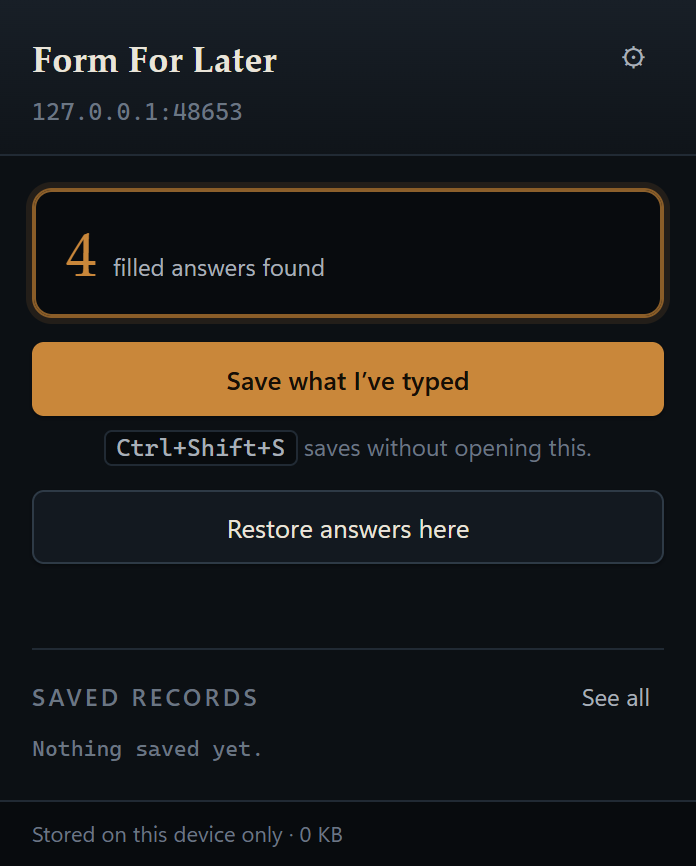
The Form For Later popup open over a partly filled job application. It reads “4 filled answers found” above a Save button, with a Restore option below it.
THE POPUP — one button, and a number you can trust.
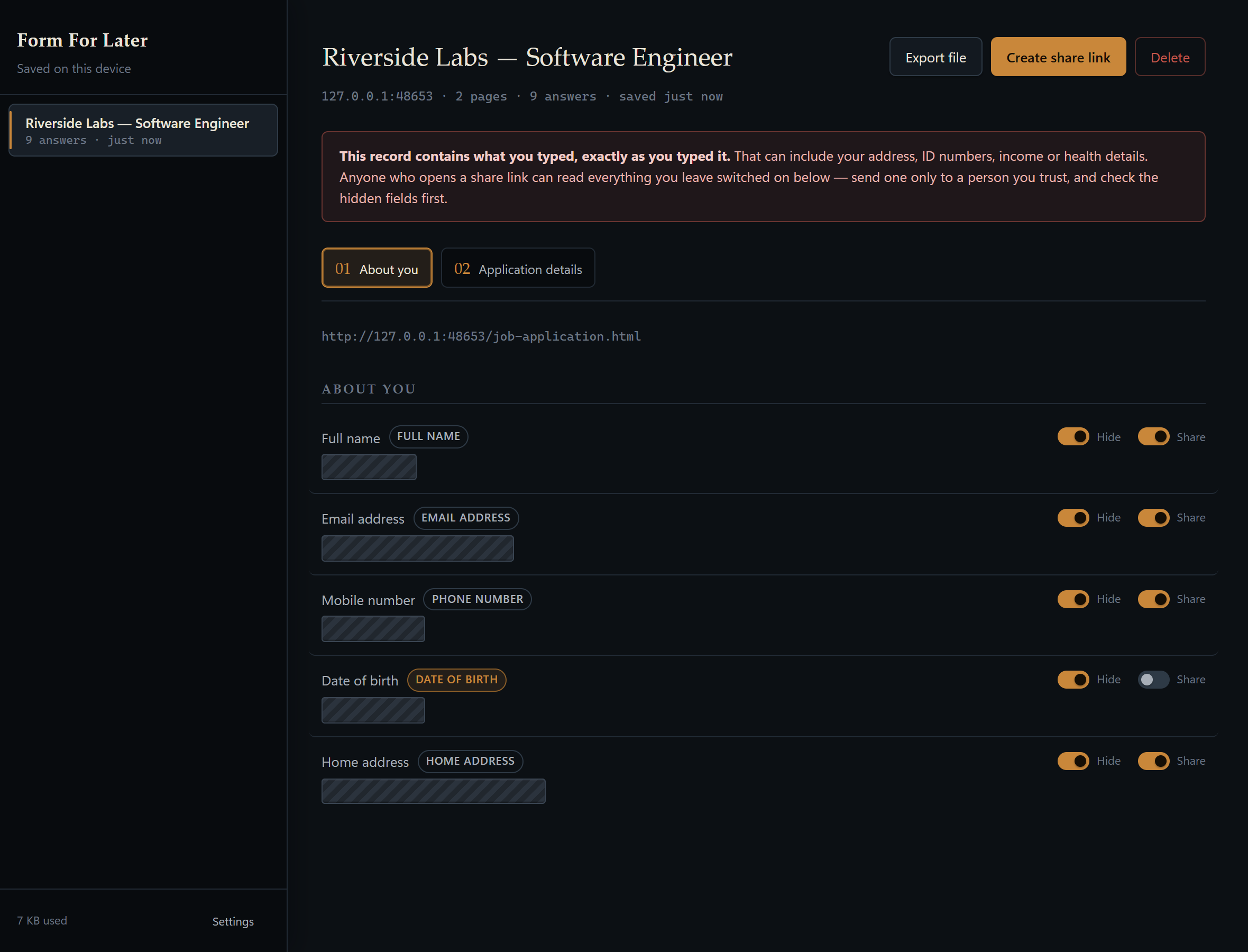
The Form For Later record viewer showing a two-page “Riverside Labs — Software Engineer” application. Full name, email, mobile number, date of birth and home address are each hidden behind a hatched redaction bar with its own Hide and Share switch.
THE RECORD — every field you saved, redacted where you asked.
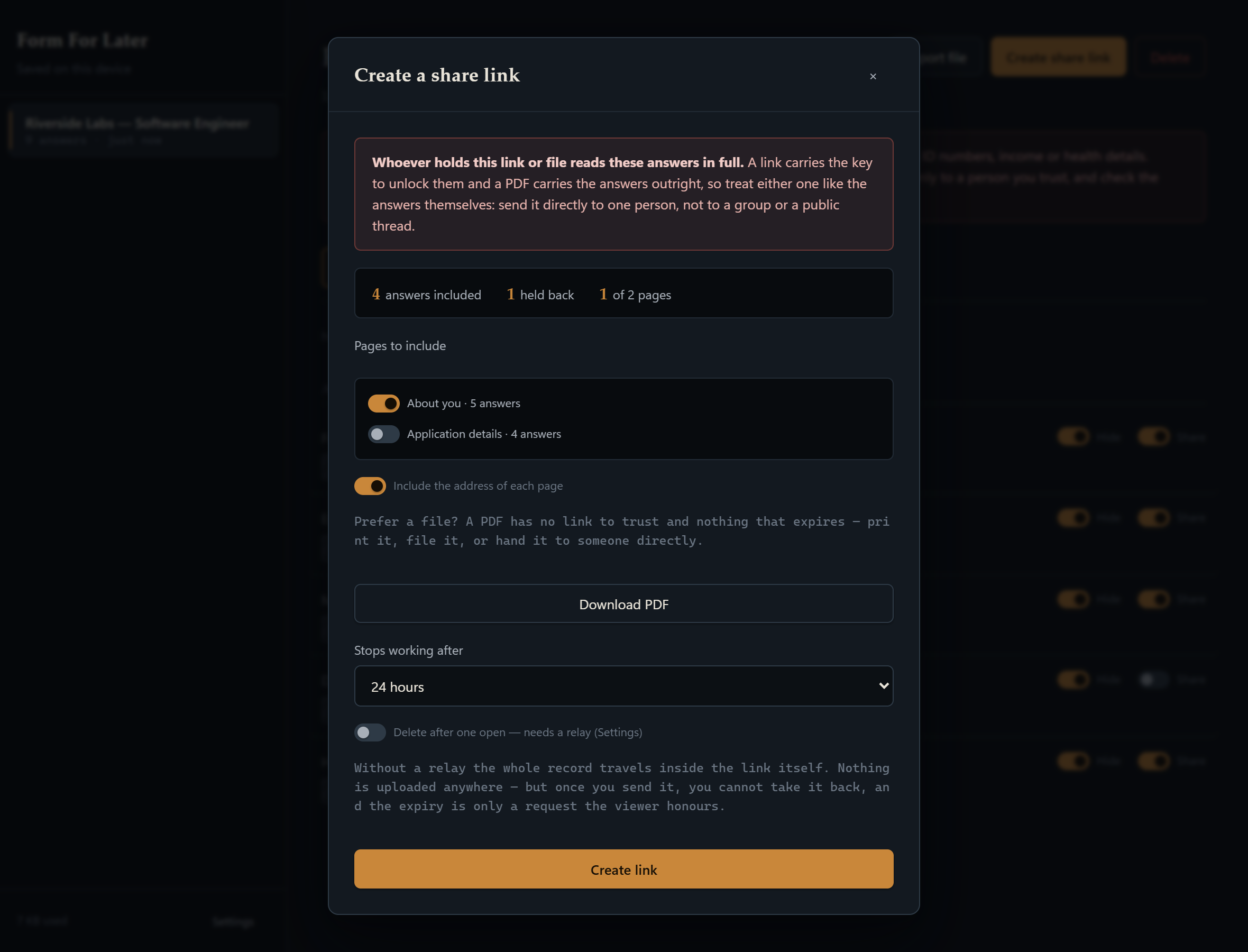
The Create a share link dialog, with the record's second page unticked. The tally reads “4 answers included, 1 held back, 1 of 2 pages.”
THE SHARE SHEET — the count you read is the count you send.
Getting it 06 / 06

Not on the Store yet.

It's in review. This button goes live the day it's approved.

CHROME 116+ · iOS: SEE ABOVE · FIREFOX: MAYBE SOMEDAY